16-Bloom Filter Commands
SpinelDB provides a set of commands to interact with probabilistic Bloom filters. A Bloom filter is a space-efficient probabilistic data structure that is used to test whether an element is a member of a set. False positive matches are possible, but false negatives are not.
Bloom Filter Structure
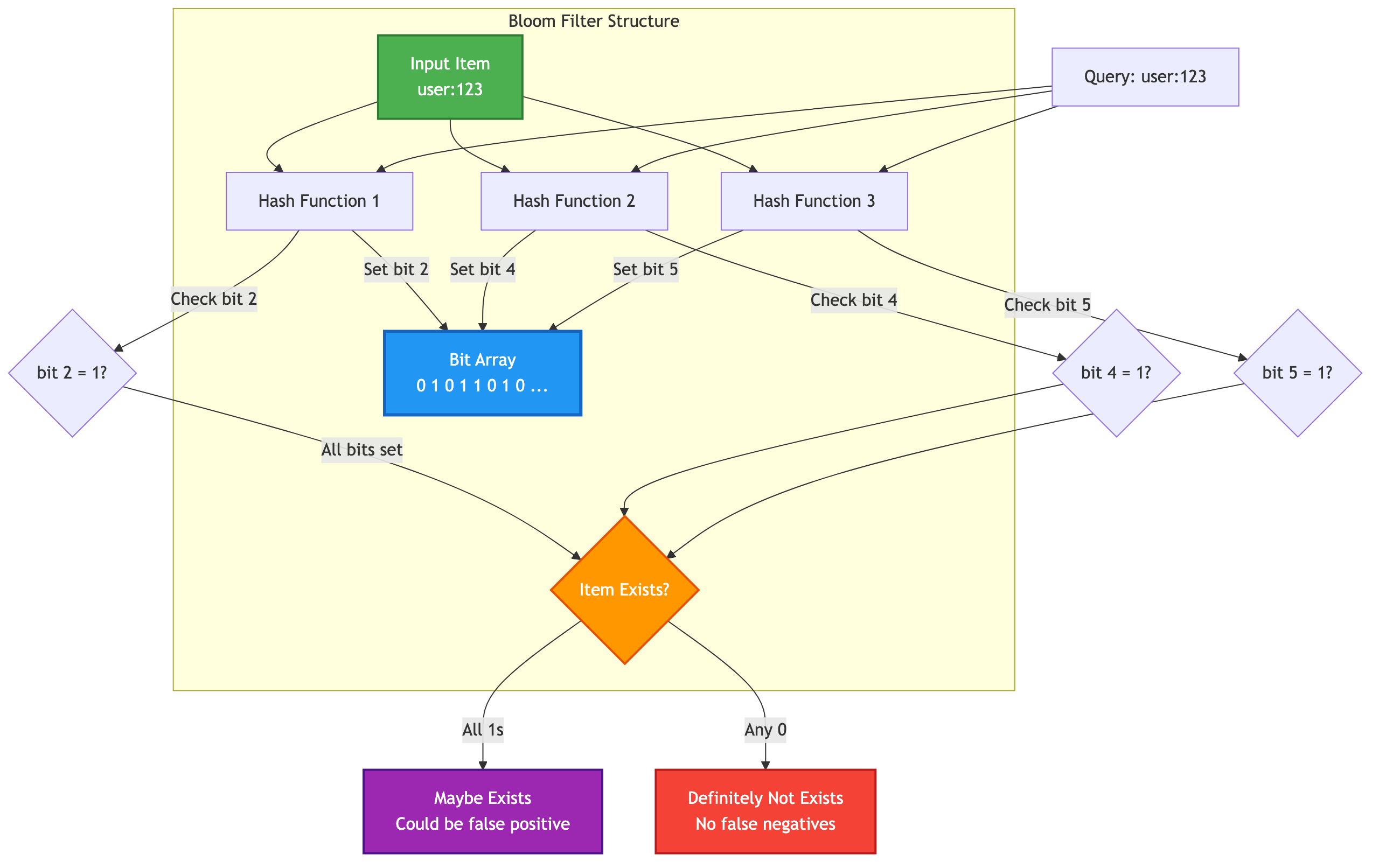
BF.RESERVE key error_rate capacity
Creates a new Bloom filter with a specified error rate and initial capacity.
- key: The name of the Bloom filter to create.
- error_rate: The desired probability of false positives, a floating-point number between 0 and 1 (exclusive). A lower value means a lower false positive rate but requires more memory.
- capacity: The expected number of items to be added to the filter. This influences the size of the filter.
Return Value:
OKon success.- Error if the key already exists or if
error_rateorcapacityare invalid.
Examples:
BF.RESERVE myapp:users:bloom 0.01 10000
This creates a Bloom filter named myapp:users:bloom that can hold approximately 10,000 items with a 1% chance of false positives.
BF.ADD key item
Adds an item to a Bloom filter. If the Bloom filter specified by the key does not exist, it is implicitly created with default parameters (capacity 100, error rate 0.01).
- key: The name of the Bloom filter.
- item: The item to add to the filter.
Return Value:
1if the item was added (a new bit was set in the filter).0if the item was already considered present in the filter (no bits were set).- Error if the key exists but holds a different data type.
Examples:
BF.ADD myapp:users:bloom user:123
BF.ADD myapp:users:bloom user:456
BF.MADD key item [item ...]
Adds one or more items to a Bloom filter.
- key: The name of the Bloom filter.
- item: One or more items to add to the filter.
Return Value:
An array of integers, one for each item. Each integer is 1 if the corresponding item was added, and 0 if it was already present.
Examples:
BF.MADD myapp:users:bloom user:789 user:101 user:102
BF.EXISTS key item
Checks if an item might be present in a Bloom filter.
- key: The name of the Bloom filter.
- item: The item to check for existence.
Return Value:
1if the item might exist in the Bloom filter (a false positive is possible).0if the item definitely does not exist in the Bloom filter.- If the key does not exist, it is treated as if the item does not exist in an empty filter, returning
0. - Error if the key exists but holds a different data type.
Examples:
BF.EXISTS myapp:users:bloom user:123  // Returns 1
BF.EXISTS myapp:users:bloom user:999  // Returns 0
BF.MEXISTS key item [item ...]
Checks if one or more items might be present in a Bloom filter.
- key: The name of the Bloom filter.
- item: One or more items to check for existence.
Return Value:
An array of integers, one for each item. Each integer is 1 if the corresponding item might exist, and 0 if it definitely does not.
Examples:
BF.MEXISTS myapp:users:bloom user:123 user:999 user:456
BF.INSERT key [CAPACITY capacity] [ERROR error_rate] ITEMS item [item ...]
Adds one or more items to a Bloom filter, creating the filter with specified options if it does not already exist.
- key: The name of the Bloom filter.
- CAPACITY capacity: (Optional) If the filter does not exist, this specifies the initial capacity.
- ERROR error_rate: (Optional) If the filter does not exist, this specifies the error rate.
- ITEMS item [item ...]: The item(s) to add. The
ITEMSkeyword is required.
Return Value:
An array of integers, one for each item. Each integer is 1 if the corresponding item was added, and 0 if it was already present.
Examples:
# Create a new filter and add items
BF.INSERT new:bloom CAPACITY 10000 ERROR 0.001 ITEMS user:a user:b

# Add items to an existing filter
BF.INSERT myapp:users:bloom ITEMS user:x user:y
BF.INFO key
Returns detailed information about a Bloom filter.
- key: The name of the Bloom filter.
Return Value: An array of key-value pairs describing the filter's properties.
- Capacity: The configured capacity of the filter.
- Size: The size of the filter in bytes.
- Number of hash functions: The number of hash functions used by the filter.
- Number of items inserted: An estimated count of the number of items added to the filter.
Examples:
BF.INFO myapp:users:bloom
BF.CARD key
Returns the number of items that have been added to a Bloom filter.
- key: The name of the Bloom filter.
Return Value:
An integer representing the number of items added. If the key does not exist, returns 0.
Examples:
BF.CARD myapp:users:bloom
Error Conditions
WRONGTYPE Operation against a key holding the wrong kind of value: Occurs when attempting to use Bloom filter commands on a key that holds a different data type (e.g., a string or a list).Key already exists: Returned byBF.RESERVEif a Bloom filter with the specified key already exists.Key not found: Returned byBF.INFOif the key does not exist.Invalid request: ...: Returned for various invalid parameter combinations, such as an invaliderror_rateor attempting to change the parameters of an existing filter withBF.INSERT.Syntax error: Returned for incorrectly formatted commands.