Chapter 6: Primary-Replica Replication
Running a single instance of SpinelDB is great for development, but for production environments, you need redundancy and the ability to scale. SpinelDB supports a standard primary-replica (formerly master-slave) replication model, which provides a simple yet powerful way to achieve high availability and scale read operations.
How It Works
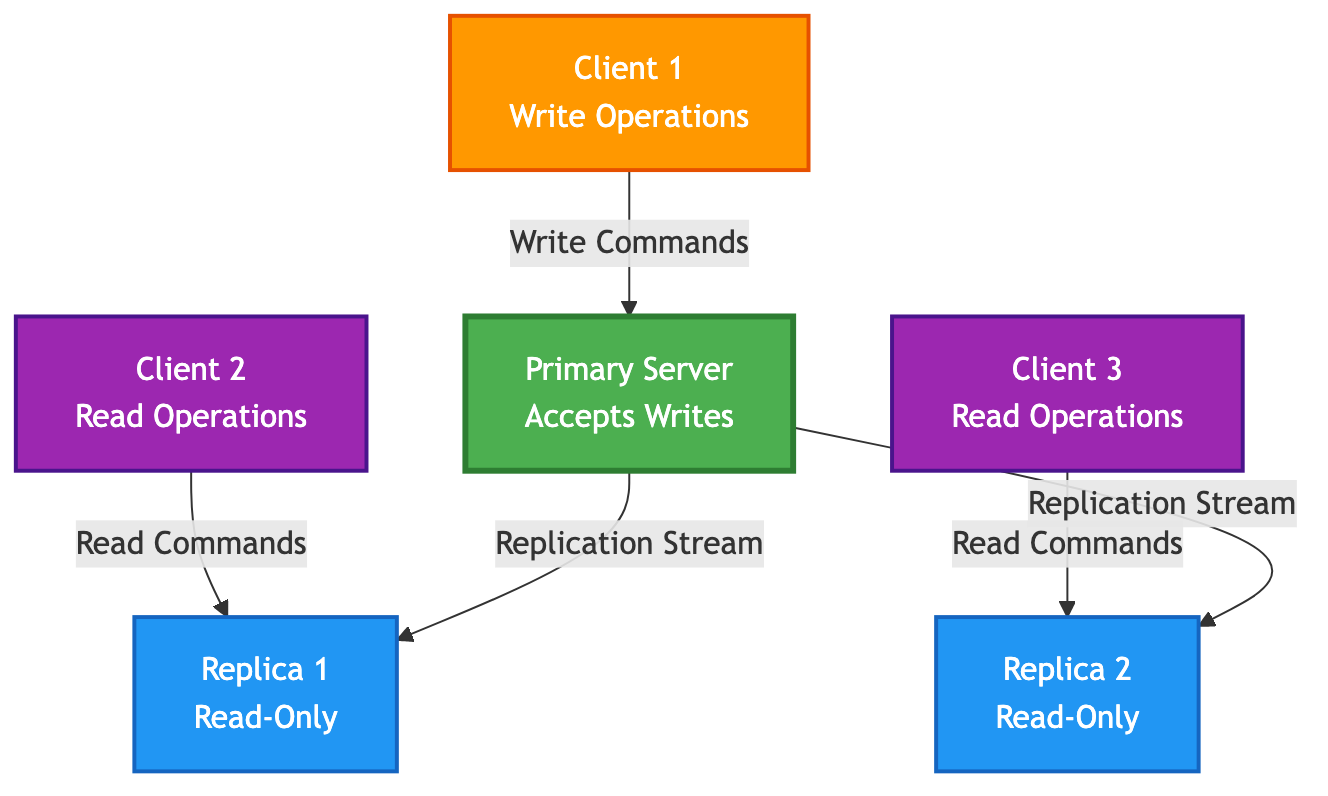
In this model, you have one primary instance and one or more replica instances.
- Primary: This is the main, authoritative instance. It accepts all write commands from clients.
- Replica: A replica is an exact, real-time copy of the primary. It connects to the primary and receives a continuous stream of the write commands that are executed on it.
Key Benefits
- High Availability & Data Redundancy: If the primary instance fails, a replica can be manually or automatically promoted to become the new primary, minimizing downtime and preventing data loss.
- Read Scaling: Read-heavy workloads can be distributed across multiple replicas. This offloads traffic from the primary, allowing it to focus on handling writes.
Primary-Replica Architecture
1. Configuring a Primary
Configuring a node as a primary is the default behavior. The main setting is in the [replication] section of your config.toml file.
# In the primary's config.toml

[replication]
role = "primary"

# [Optional] Data Safety Configuration
# You can configure the primary to reject writes if it doesn't have a minimum
# number of healthy replicas connected. This prevents data loss in a network partition.
#
# Reject writes if there are fewer than 1 replica connected.
min_replicas_to_write = 1
#
# A replica is considered "healthy" if its last acknowledgment was received
# within this many seconds.
min_replicas_max_lag = 10
Simply start the server with this configuration, and it will act as a primary, ready to accept connections from replicas.
2. Configuring a Replica
To configure a node as a replica, you need to tell it the address of the primary it should connect to.
# In the replica's config.toml

[replication]
role = "replica"
primary_host = "192.168.1.10" # IP address of the primary server
primary_port = 7878          # Port of the primary server
# tls_enabled = false        # Set to true if the primary requires TLS
When you start this instance, it will not accept write commands from clients. Instead, it will automatically attempt to connect to the primary at the specified address and begin the synchronization process.
3. The Synchronization Process
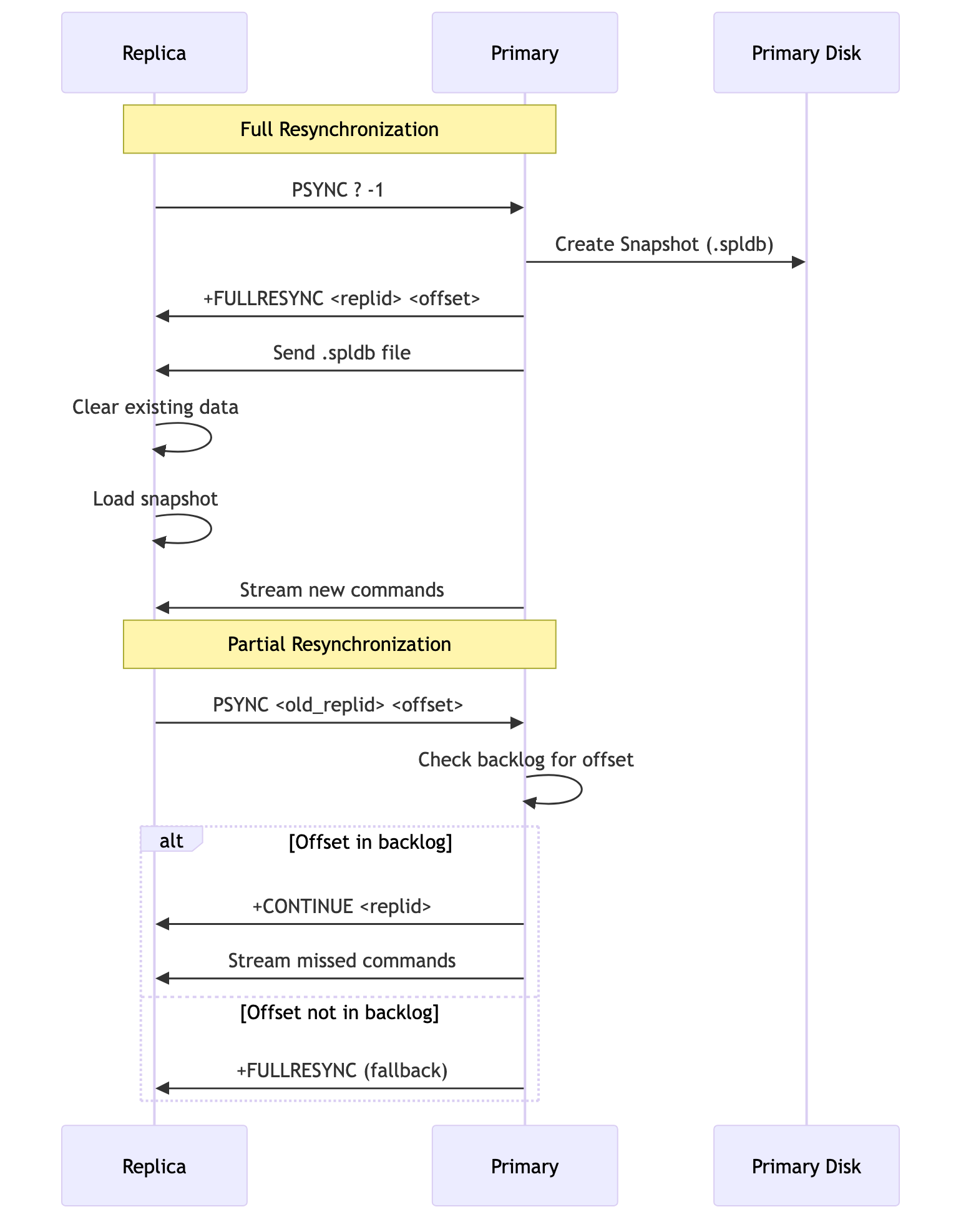
When a replica first connects to a primary, it needs to get a full copy of the dataset. This process is called synchronization. SpinelDB uses a Redis-compatible protocol (PSYNC) and supports two types of syncs:
Full Resynchronization
This happens when a replica connects for the first time, or after it has been disconnected for too long.
- The replica sends a
PSYNCrequest to the primary. - The primary recognizes it's a new replica and starts a background save, creating a snapshot of its entire dataset in the
.spldbfile format. - The primary sends this
.spldbfile over the network to the replica. - The replica receives the file, clears all its existing data, and loads the snapshot into memory.
- Once the snapshot is loaded, the primary starts streaming all new write commands that have occurred since the snapshot was started.
This process is robust but can be resource-intensive for large datasets.
Partial Resynchronization
To avoid the cost of a full resync for brief disconnections (like a network hiccup or a quick restart), the primary maintains a special in-memory circular buffer called the replication backlog. This backlog stores the most recent stream of write commands.
- A replica that was previously connected disconnects.
- It reconnects shortly after and sends a
PSYNCrequest, telling the primary its old replication ID and the offset (the last command it processed). - The primary checks if the requested offset is still available in its backlog.
- If it is, the primary sends a
+CONTINUEresponse and streams only the missed commands from the backlog to the replica. - The replica applies these commands and is quickly back in sync.
This process is extremely fast and efficient, making the replication system resilient to transient network issues. If the replica is disconnected for too long and the required offset is no longer in the backlog, the primary will force a full resynchronization.
Synchronization Process Flow
4. Verifying Replication Status
You can check the status of replication on both the primary and replica nodes using the INFO replication command.
On the Primary:
127.0.0.1:7878> INFO replication
# Replication
role:master
master_replid:a1b2c3d4...
master_repl_offset:12345
connected_slaves:1
slave0:ip=192.168.1.11,port=7878,state=online,offset=12345,lag=0
This shows you the primary's own replication ID and offset, and a list of all connected replicas and their status.
On a Replica:
192.168.1.11:7878> INFO replication
# Replication
role:slave
master_host:192.168.1.10
master_port:7878
master_link_status:up
master_last_io_seconds_ago:1
master_sync_in_progress:0
slave_repl_offset:12345
This confirms that the node is a replica and shows its connection status to the primary and how up-to-date it is.