Chapter 8: Automatic Failover with Warden
While SpinelDB Cluster provides a foundation for high availability, its built-in, replica-initiated failover mechanism has limitations, particularly concerning split-brain scenarios during network partitions. For production deployments, a more robust solution is required.
Enter SpinelDB Warden.
Warden is a separate, lightweight process that acts as a sentinel or external coordinator for your SpinelDB instances. You run a small number of Warden processes (typically 3 or 5 for a quorum) alongside your database nodes. These Wardens monitor your primary and replica instances, communicate with each other, and manage the failover process.
Why Use Warden?
- Quorum-Based Decisions: A failover is only triggered when a quorum (a majority) of Warden instances agree that a primary is down. This prevents a single, network-isolated Warden from incorrectly initiating a failover.
- Split-Brain Prevention: Because decisions are made by an external majority, Warden provides strong protection against split-brain scenarios where a partitioned primary might otherwise continue accepting writes.
- Reliable Master Discovery: Warden provides a stable endpoint for your application clients. Instead of connecting directly to the database, clients query a Warden to ask, "Who is the current primary for master group
X?". Warden always provides the correct, up-to-date address, even after a failover.
Production Recommendation: For any production setup requiring high availability, using Warden for failover management is strongly recommended over the built-in cluster failover.
1. Warden Configuration
Warden runs using its own configuration file, typically named warden.toml. It does not use the main config.toml.
Example warden.toml
Here is an example configuration for a Warden monitoring a primary-replica group named mymaster.
# The address and port for this Warden instance to listen on for client queries.
host = "0.0.0.0"
port = 26379

# The address this Warden should announce to its peers.
# Useful if running in a containerized environment like Docker or Kubernetes.
# announce_ip = "10.0.1.5"

# Define each primary group you want to monitor.
# 'masters' is an array table.
[[masters]]
# A unique name for this primary-replica group.
name = "mymaster"

# The initial address of the primary server.
ip = "192.168.1.10"
port = 7878

# The number of Wardens that must agree a master is down before starting a failover.
# For N Wardens, this should be (N/2) + 1.
quorum = 2

# The time after which a non-responding instance is considered down.
down_after = "30s"

# The maximum time a failover can take.
failover_timeout = "3m"

# How often this Warden will publish "hello" messages to other Wardens.
hello_interval = "2s"
You would create a similar warden.toml file on each machine where you intend to run a Warden process.
2. Running Warden
To start SpinelDB in Warden mode, you use the --warden command-line flag, followed by the path to your warden.toml file.
# Start the binary in Warden mode
./target/release/spineldb --warden /path/to/warden.toml
You should run at least three Warden instances on different machines for a fault-tolerant setup. They will discover each other automatically by subscribing to a special __warden__:hello channel on the SpinelDB primary they are monitoring.
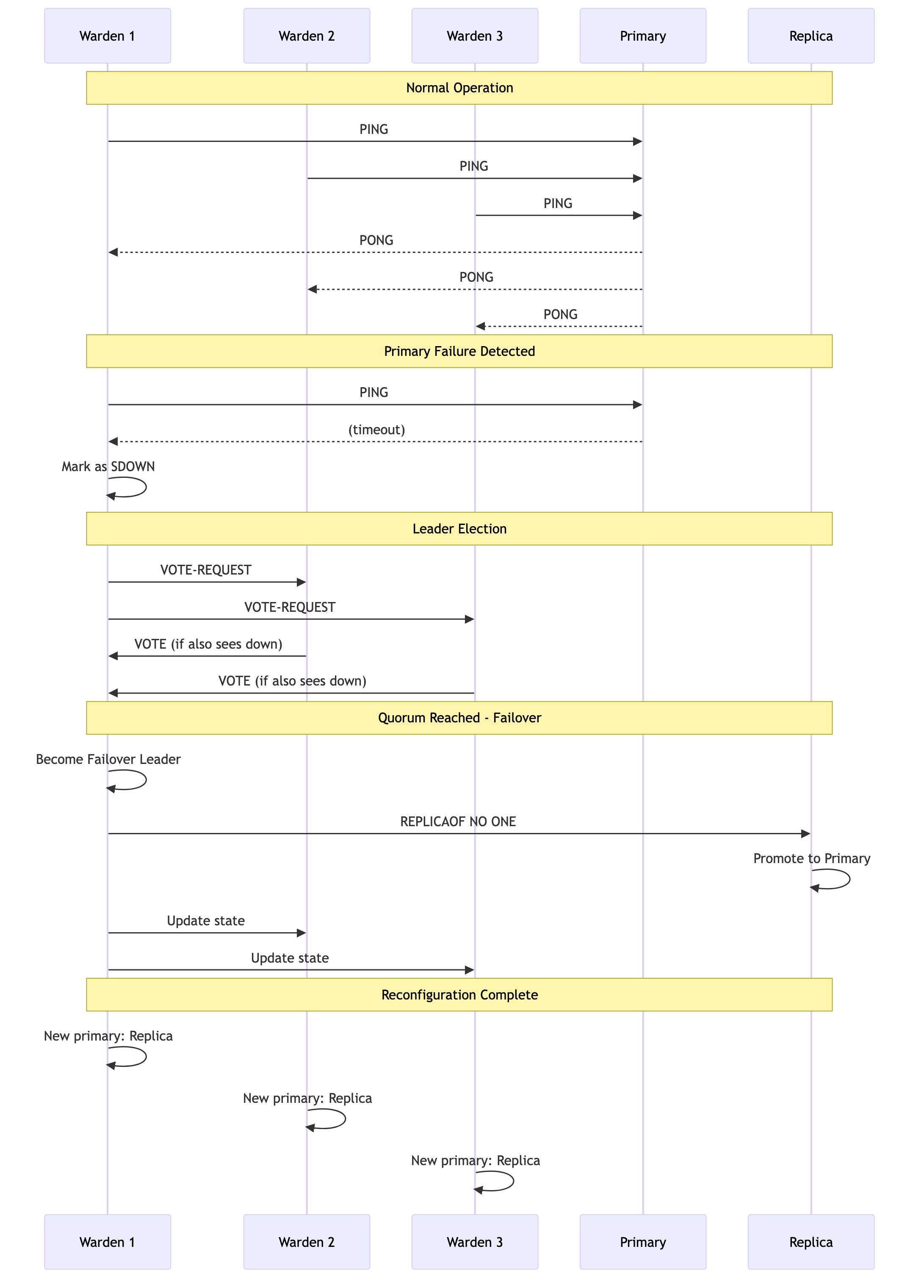
3. The Failover Process in Action
Here’s a step-by-step look at what happens when a primary fails:
- Monitoring: Each Warden instance independently sends
PINGandINFOcommands to themymasterprimary and all its known replicas. - Subjective Down (SDOWN): One Warden fails to get a response from the primary within the
down_afterperiod. It internally marks the primary as SDOWN. - Leader Election: The Warden that detected the failure starts a leader election by sending a
VOTE-REQUESTto all other Wardens monitoringmymaster. - Voting: Other Wardens, if they also see the master as down and haven't voted in a more recent election, will cast a vote for the requesting Warden.
- Quorum & Leadership: Once a Warden receives votes from a
quorumof its peers, it becomes the failover leader. - Replica Selection: The leader analyzes the last known state of all replicas and selects the best one to promote (based on replication offset).
- Promotion: The leader sends a
REPLICAOF NO ONEcommand to the chosen replica, promoting it to a primary. - Reconfiguration: The leader then sends
REPLICAOF <new_master_ip> <new_master_port>commands to all other replicas (and the old, failed primary if it becomes reachable again) to ensure they follow the new primary. - State Update: All Wardens update their internal state to reflect the new primary address for
mymaster.
The entire process is automated and typically completes within seconds.
Failover Process Flow