Chapter 10: Server-Side Scripting with Lua
While SpinelDB offers a rich set of commands, sometimes you need to perform a sequence of operations atomically without the overhead of a MULTI/EXEC transaction or multiple network round-trips. SpinelDB, like Redis, solves this with server-side Lua scripting.
You can send a Lua script to the server, which will execute it in a sandboxed environment. From within the script, you have access to a special API to call SpinelDB commands. The entire script runs as a single, atomic operation—no other command will be executed while your script is running.
Key Benefits
- Atomicity: The script is guaranteed to execute without interruption.
- Performance: Reduces network latency by combining multiple operations into a single round-trip.
- Data Locality: Logic is executed where the data lives, avoiding the need to transfer intermediate data back and forth to the client.
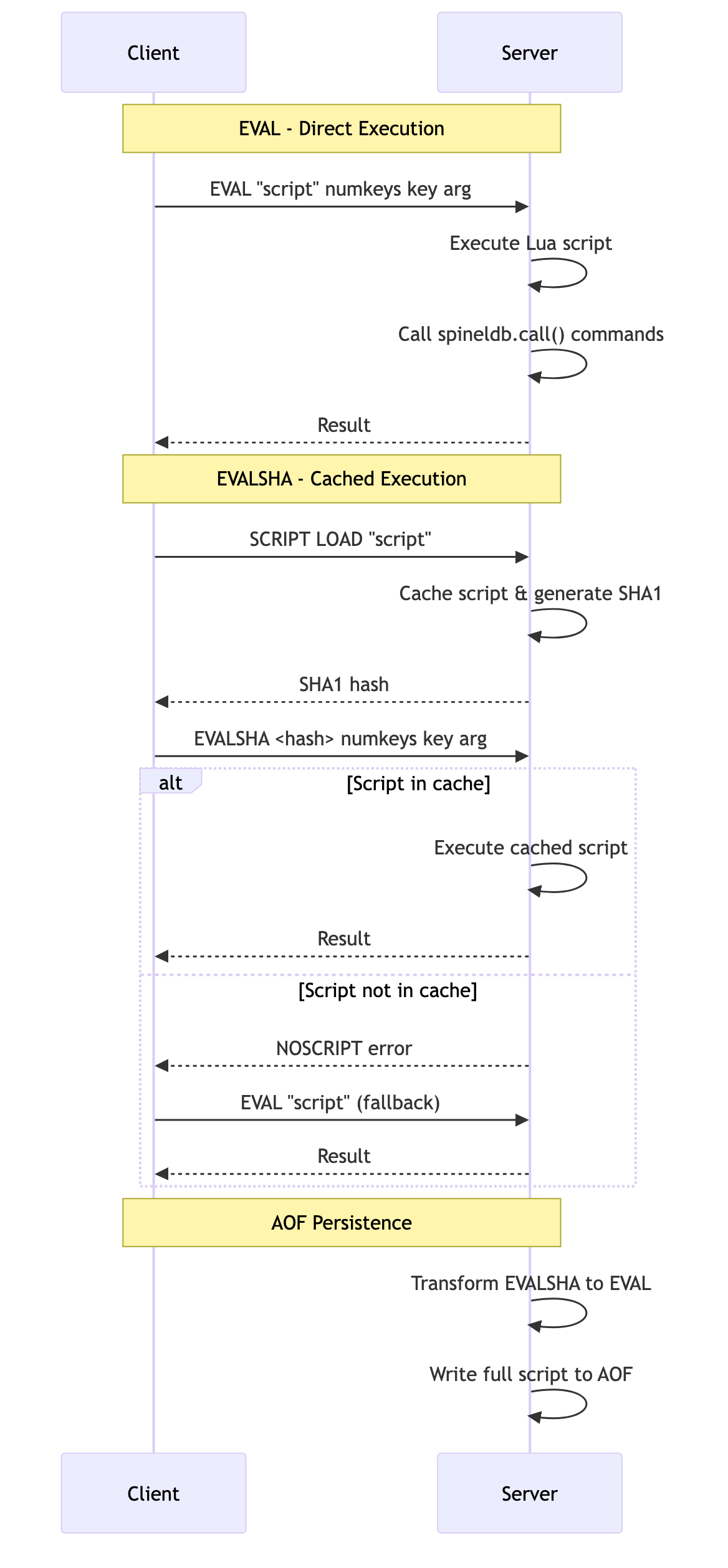
Lua Scripting Flow
1. Executing Scripts with EVAL
The EVAL command is the primary way to execute a Lua script.
Command: EVAL <script> <numkeys> [key ...] [arg ...]
<script>: The Lua script as a string.<numkeys>: The number of arguments that follow which should be treated as key names. This is crucial for SpinelDB Cluster to ensure all keys in a script are located in the same hash slot.[key ...]An optional list of key names, accessible in Lua via the globalKEYStable.[arg ...]An optional list of additional arguments, accessible in Lua via the globalARGVtable.
Example: Atomic GET-and-SET
Let's write a script that gets the value of a key and, if it matches an expected value, sets it to a new value. This is an atomic compare-and-swap operation.
-- Lua Script
-- KEYS[1] is the key to operate on
-- ARGV[1] is the expected old value
-- ARGV[2] is the new value

local current_val = spineldb.call('GET', KEYS[1])
if current_val == ARGV[1] then
  spineldb.call('SET', KEYS[1], ARGV[2])
  return 1 -- Return 1 for success
else
  return 0 -- Return 0 for failure
end
Now, let's execute this script using redis-cli:
# First, set an initial value
127.0.0.1:7878> SET mykey "old-value"
OK

# Execute the script.
# Script: The lua code as a single string
# numkeys: 1 (we are passing one key, "mykey")
# key: mykey
# arg: old-value
# arg: new-value
127.0.0.1:7878> EVAL "local current_val = spineldb.call('GET', KEYS[1]) if current_val == ARGV[1] then spineldb.call('SET', KEYS[1], ARGV[2]) return 1 else return 0 end" 1 mykey "old-value" "new-value"
(integer) 1

# Check the new value
127.0.0.1:7878> GET mykey
"new-value"

# Try running it again with the wrong "old-value"
127.0.0.1:7878> EVAL "local current_val = spineldb.call('GET', KEYS[1]) if current_val == ARGV[1] then spineldb.call('SET', KEYS[1], ARGV[2]) return 1 else return 0 end" 1 mykey "wrong-old-value" "another-value"
(integer) 0
The key's value was not changed the second time because the condition failed. The entire operation was atomic.
2. Calling SpinelDB Commands from Lua
Inside a Lua script, you cannot execute arbitrary system commands. You interact with the database through the spineldb global table.
spineldb.call(command, key, ...): Executes a SpinelDB command. If the command results in an error, the entire script will stop and return that error to the client.spineldb.pcall(command, key, ...): A "protected" call. It executes a command but will not stop the script if it fails. Instead, it returns a Lua table containing anerrkey with the error message. This allows you to handle errors gracefully within your script.
3. Caching Scripts with SCRIPT LOAD and EVALSHA
Sending the same large script to the server repeatedly is inefficient. SpinelDB allows you to cache scripts on the server and execute them later using their unique SHA1 hash.
Commands: SCRIPT LOAD, EVALSHA
Workflow
- Load the Script: Use
SCRIPT LOADto send the script to the server once. SpinelDB will cache it and return its SHA1 hash. - Execute by Hash: Use
EVALSHAwith the returned hash to execute the cached script. This is much faster as you are only sending the small hash over the network.
Example Session
Let's cache and run our compare-and-swap script.
# Step 1: Load the script into the server's cache
127.0.0.1:7878> SCRIPT LOAD "local current_val = spineldb.call('GET', KEYS[1]) if current_val == ARGV[1] then spineldb.call('SET', KEYS[1], ARGV[2]) return 1 else return 0 end"
"b3c2e36d40...<rest_of_hash>"  # The server returns the SHA1 hash

# Step 2: Set an initial value
127.0.0.1:7878> SET anotherkey "initial"
OK

# Step 3: Execute the script using its hash
# The arguments are the same as EVAL, just replacing the script with the SHA1 hash.
127.0.0.1:7878> EVALSHA b3c2e36d40...<rest_of_hash> 1 anotherkey "initial" "updated"
(integer) 1

# Verify the result
127.0.0.1:7878> GET anotherkey
"updated"
Your application should first try EVALSHA. If the server returns a NOSCRIPT error (meaning the script isn't in the cache, perhaps due to a server restart), your client should then fall back to using EVAL once to re-load and execute the script. Most client libraries handle this logic for you.
Persisting Scripts for Durability
When you use SCRIPT LOAD or EVALSHA, SpinelDB ensures that these scripts are also persisted to the Append-Only File (AOF) for durability. To guarantee that the AOF remains self-contained and can be replayed correctly even after a server restart or on a replica, SpinelDB transforms EVALSHA commands into EVAL commands that include the full script body. This means you don't have to worry about scripts being missing when recovering from an AOF or during replication; the AOF will always contain the necessary script content to rebuild the state.