Chapter 12: Publish/Subscribe Messaging
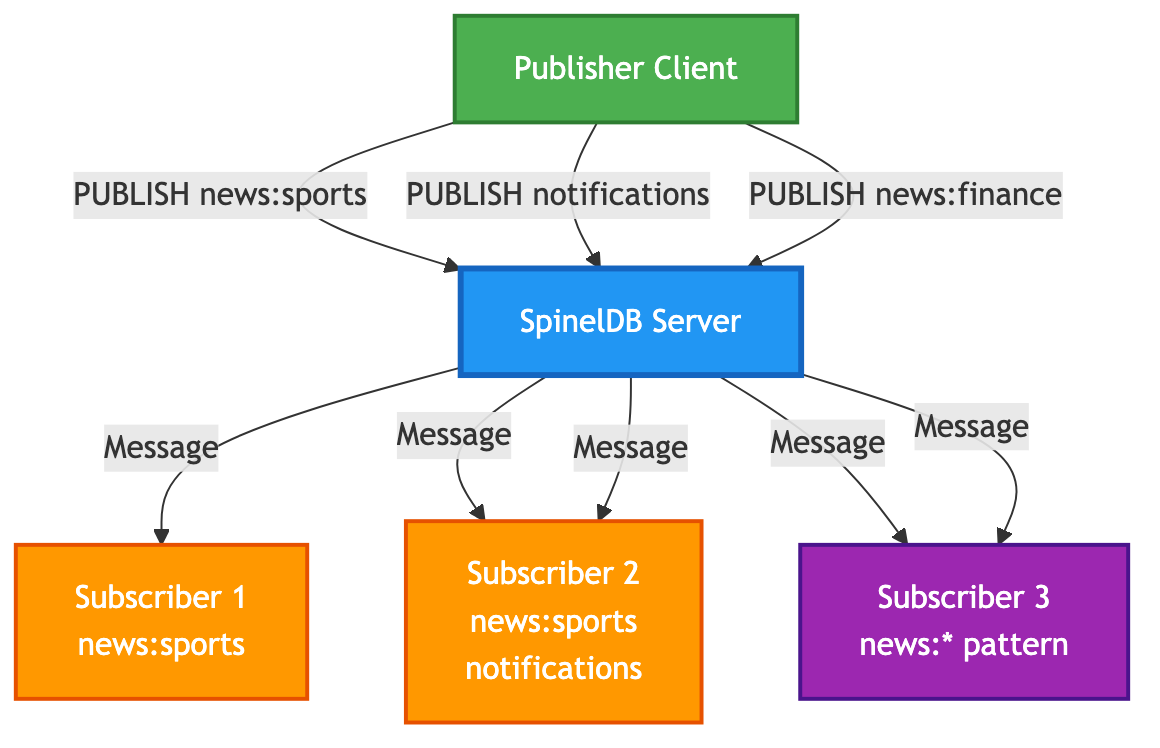
Beyond storing data, SpinelDB provides a powerful real-time messaging system based on the Publish/Subscribe (or Pub/Sub) pattern. This system allows clients to subscribe to named channels and receive messages as soon as they are published, without needing to poll the database.
This decouples message producers (publishers) from message consumers (subscribers), making it an excellent foundation for:
- Real-time notifications and chat applications.
- Distributing events in a microservices architecture.
- Live data feeds for dashboards and user interfaces.
- Triggering background jobs.
Pub/Sub Architecture
1. Subscribing to Channels (SUBSCRIBE)
A client can listen for messages on one or more specific channels by using the SUBSCRIBE command.
Command: SUBSCRIBE channel [channel ...]
When a client issues a SUBSCRIBE command, its connection is put into a special "Pub/Sub mode." In this mode, it can no longer execute regular commands (like GET or SET). It can only listen for messages and manage its subscriptions.
Example Session
Let's open two redis-cli windows to simulate a subscriber and a publisher.
Terminal 1 (Subscriber):
# Connect to SpinelDB
redis-cli -p 7878

# Subscribe to the 'news:sports' and 'notifications' channels
127.0.0.1:7878> SUBSCRIBE news:sports notifications
# The client will now block, waiting for messages.
Reading messages... (press Ctrl-C to quit)
1) "subscribe"
2) "news:sports"
3) (integer) 1
1) "subscribe"
2) "notifications"
3) (integer) 2
The response to SUBSCRIBE is a series of messages confirming the subscription to each channel. The final integer indicates the total number of channels the client is now subscribed to.
2. Publishing Messages (PUBLISH)
Any client (even one not in Pub/Sub mode) can send a message to a channel using the PUBLISH command. SpinelDB will instantly broadcast this message to all clients currently subscribed to that channel.
Command: PUBLISH channel message
Example Session
Terminal 2 (Publisher):
# Connect to the same SpinelDB server
redis-cli -p 7878

# Publish a message to the 'news:sports' channel.
# The command returns the number of subscribers who received the message.
127.0.0.1:7878> PUBLISH news:sports "Team A wins the championship!"
(integer) 1

# Publish to a channel that has no subscribers.
127.0.0.1:7878> PUBLISH news:finance "Market is up"
(integer) 0
Terminal 1 (Subscriber):
Almost instantly after the PUBLISH command is run in Terminal 2, the following message will appear in Terminal 1:
1) "message"
2) "news:sports"
3) "Team A wins the championship!"
This is a "message" type response, indicating the channel the message arrived on and the message payload itself.
3. Pattern Subscriptions (PSUBSCRIBE)
Sometimes you want to subscribe to a group of channels without knowing all their names in advance. SpinelDB supports this with pattern subscriptions, using glob-style wildcards (*, ?, []).
Command: PSUBSCRIBE pattern [pattern ...]
Example Session
Let's have our subscriber listen to all channels under the news: namespace.
Terminal 1 (Subscriber):
First, unsubscribe from the previous channels with UNSUBSCRIBE. Then:
# Subscribe to all channels that start with "news:"
127.0.0.1:7878> PSUBSCRIBE news:*
Reading messages... (press Ctrl-C to quit)
1) "psubscribe"
2) "news:*"
3) (integer) 1
Terminal 2 (Publisher):
Now, let's publish to a few different news: channels.
127.0.0.1:7878> PUBLISH news:sports "Another sports update"
(integer) 1
127.0.0.1:7878> PUBLISH news:finance "Stock market closes high"
(integer) 1
Terminal 1 (Subscriber):
The subscriber will receive both messages, and the response format is slightly different to indicate which pattern matched.
1) "pmessage"
2) "news:*"          # The pattern that matched
3) "news:sports"      # The original channel the message was published to
4) "Another sports update"

1) "pmessage"
2) "news:*"
3) "news:finance"
4) "Stock market closes high"
4. Unsubscribing
To leave Pub/Sub mode or stop listening to specific channels/patterns, use the UNSUBSCRIBE and PUNSUBSCRIBE commands.
- Calling
UNSUBSCRIBEwith no arguments will unsubscribe the client from all its exact-match channel subscriptions. - Calling
PUNSUBSCRIBEwith no arguments will unsubscribe the client from all its pattern subscriptions.
Once a client is no longer subscribed to any channels or patterns, its connection automatically returns to normal mode, and it can execute regular commands again.