Chapter 11: Atomic Operations with Transactions
While Lua scripts are excellent for creating new atomic operations, sometimes you need to run a sequence of existing commands as a single, atomic transaction. SpinelDB supports this with the MULTI, EXEC, DISCARD, and WATCH commands, providing a mechanism for optimistic locking.
A transaction guarantees that either all of the commands in the sequence are executed, or none of them are. The commands are executed sequentially without interruption from other clients.
Transaction Flow
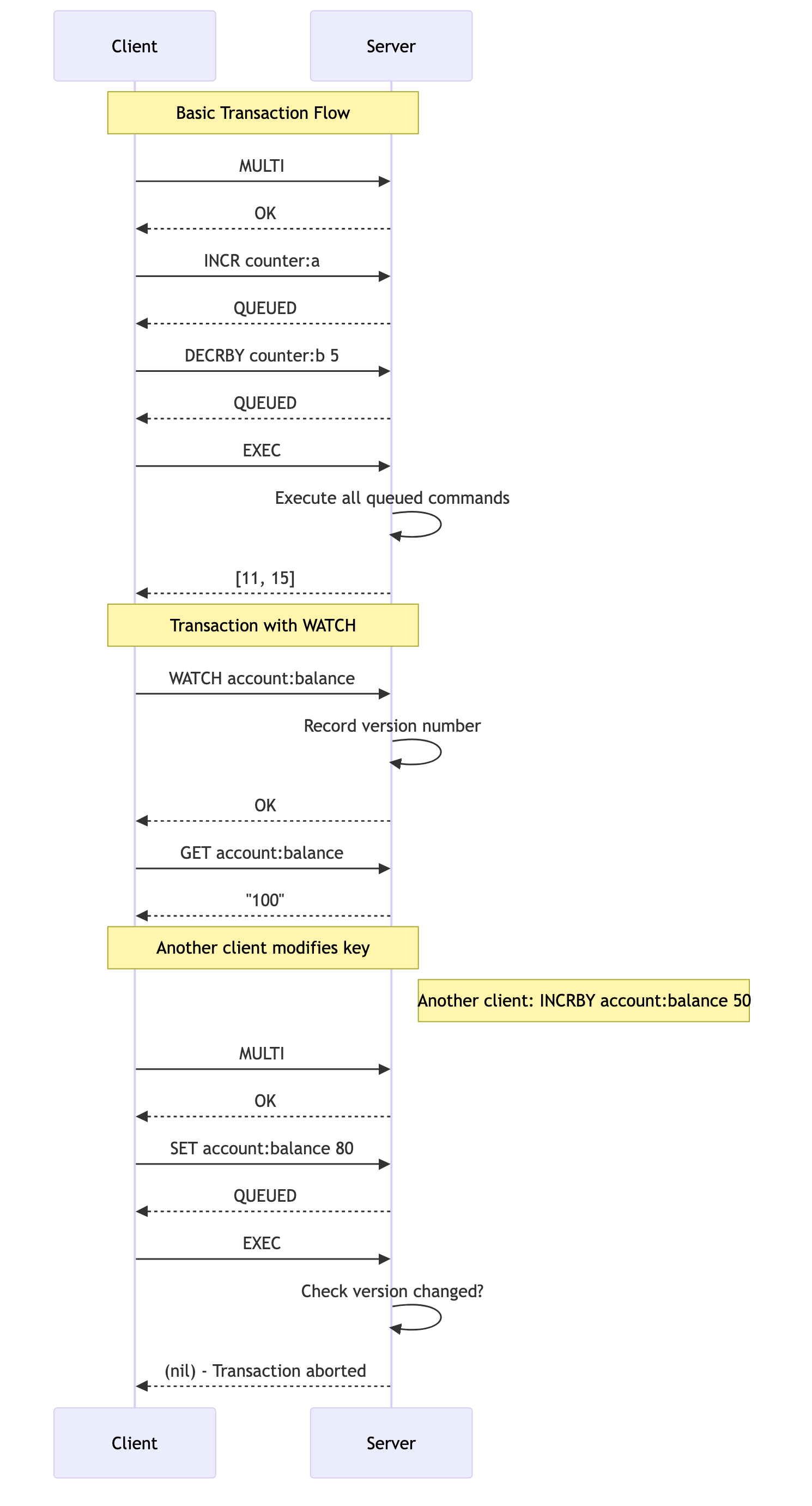
1. Basic Transactions with MULTI and EXEC
The core of a transaction is the MULTI/EXEC block.
MULTI: Starts a transaction block. All subsequent commands from the client are not executed immediately but are instead queued.EXEC: Executes all the commands that have been queued since theMULTIcommand was issued. The response is an array containing the reply for each command in the order they were queued.
Commands: MULTI, EXEC, DISCARD
Example Session
Let's use a transaction to atomically increment two separate counters.
# Set initial values
127.0.0.1:7878> SET counter:a 10
OK
127.0.0.1:7878> SET counter:b 20
OK

# Start the transaction block. The server replies with OK.
127.0.0.1:7878> MULTI
OK

# Queue the first command. The server replies with QUEUED.
127.0.0.1:7878> INCR counter:a
QUEUED

# Queue the second command.
127.0.0.1:7878> DECRBY counter:b 5
QUEUED

# Execute the transaction.
127.0.0.1:7878> EXEC
1) (integer) 11
2) (integer) 15
The server's reply to EXEC is an array where the first element is the result of INCR counter:a and the second is the result of DECRBY counter:b 5. We can be certain that no other client could have modified these counters between our INCR and DECRBY operations.
If you decide to cancel the transaction before running EXEC, you can use the DISCARD command.
127.0.0.1:7878> MULTI
OK
127.0.0.1:7878> INCR counter:a
QUEUED
127.0.0.1:7878> DISCARD
OK

# The INCR was not executed.
127.0.0.1:7878> GET counter:a
"11"
2. Optimistic Locking with WATCH
What happens if another client modifies a key after you've started thinking about your transaction, but before you've called MULTI? This could lead to a race condition where your transaction operates on stale data.
The WATCH command solves this problem by providing check-and-set (CAS) capabilities, also known as optimistic locking. SpinelDB achieves this by internally tracking a version number for each key. When you WATCH a key, SpinelDB records its current version. If this version changes before your EXEC command, the transaction is aborted.
Workflow:
WATCH key ...: You tell SpinelDB which keys you intend to modify in your transaction. SpinelDB starts monitoring these keys for any changes by recording their internal version numbers.- You read the values of the watched keys and perform your application logic.
MULTI/EXEC: You start and execute your transaction.- Verification: Just before executing your queued commands, SpinelDB checks if the version numbers of any keys you
WATCHed have changed. This indicates another client has modified them.- If no keys were modified, the transaction executes normally.
- If any key was modified, the transaction is aborted, and
EXECreturns a(nil)reply. Your application should then retry the entire process (watch, read, multi, exec).
Example Session
Let's simulate a race condition.
Client 1 (Our Application):
# Set an initial balance
127.0.0.1:7878> SET account:balance 100
OK

# Watch the key we intend to modify
127.0.0.1:7878> WATCH account:balance
OK

# Read the current balance (application logic would do this)
127.0.0.1:7878> GET account:balance
"100"
Client 2 (Another Process):
At this exact moment, another client makes a deposit, modifying the key that Client 1 is watching.
127.0.0.1:7878> INCRBY account:balance 50
(integer) 150
Client 1 (Continuing its Transaction):
Client 1's application logic, based on the stale value of "100", decides to set the new balance to "80".
127.0.0.1:7878> MULTI
OK
127.0.0.1:7878> SET account:balance 80
QUEUED

# Try to execute the transaction
127.0.0.1:7878> EXEC
(nil)
The EXEC command returned (nil)! SpinelDB detected that account:balance was modified after WATCH was called, so it aborted the transaction to prevent the incorrect value ("80") from overwriting the correct new value ("150").
Client 1's application should now detect the (nil) reply and retry the entire operation, ensuring it reads the new, correct balance of 150.